
Let’s be honest: you’ve got a killer product, but delivering it in a plain, boring brown box feels like a missed opportunity. You want that “wow” moment when your customer sees their package on the porch. But what if you aren’t a professional graphic designer?
Enter Canva.
At BoxUp, we’re all about making custom packaging accessible to everyone. That’s why we’ve optimized our workflow to complement the world’s favorite design tool. If you’re wondering how to level up your brand without the steep learning curve of high-end software, here is everything you need to know about designing your dream box in Canva.
Why use Canva for designing custom boxes?
You are probably already familiar with Canva, but in case you are new to design, it’s intuitive, drag-and-drop, and—best of all—built for creators of all skill levels. Here are some of the benefits:
A Literal Treasure Trove of Assets: Canva gives you access to millions of fonts, illustrations, and photos. Whether you want a minimalist boho vibe or a loud, neon geometric pattern, the assets are already there. You don’t need to draw a single line if you don’t want to.
Brand Kits for Consistency: If you have a Pro account, you can save your brand colors, logos, and fonts. This means every box you design will perfectly match your website and social media, keeping your brand identity tight and professional.
Collaboration Made Easy: Working with a partner? You can share your design link and work on the box design together in real-time.
How can I design my box in Canva?
Designing for 3D packaging is a little different than designing a social media post, but Canva makes it surprisingly simple. Here are a few ways you can flex your creative muscles:
-
Play with Patterns: Use the “Elements” tab to find seamless patterns. A subtle pattern on the inside of your box (yes, we do inside printing too!) creates a premium unboxing experience.
-
Text that Pops: Use Canva’s text effects to add shadows, glows, or curved text that follows the shape of your box panels.
-
Upload Your Own Magic: Already have a logo or specific brand illustrations? Just drag them into Canva and drop them onto your BoxUp template.
Making the Magic Happen: From Canva to Your Doorstep
We get asked all the time: “Is it actually easy to get my design from Canva onto a physical box?” The answer is a resounding YES. We’ve streamlined the process so you can spend less time worrying about “technical specs” and more time being creative.
Step 1: Get Your Template Head over to our Canva Tutorial Page and download the specific template for the box size you’re ordering. These PDFs are specially formatted to act as your canvas.
Step 2: The Upload Open Canva, hit “Create a design,” and upload the BoxUp PDF. It will open as a new project with all the “dielines” (the lines showing where the box folds and cuts) clearly visible.
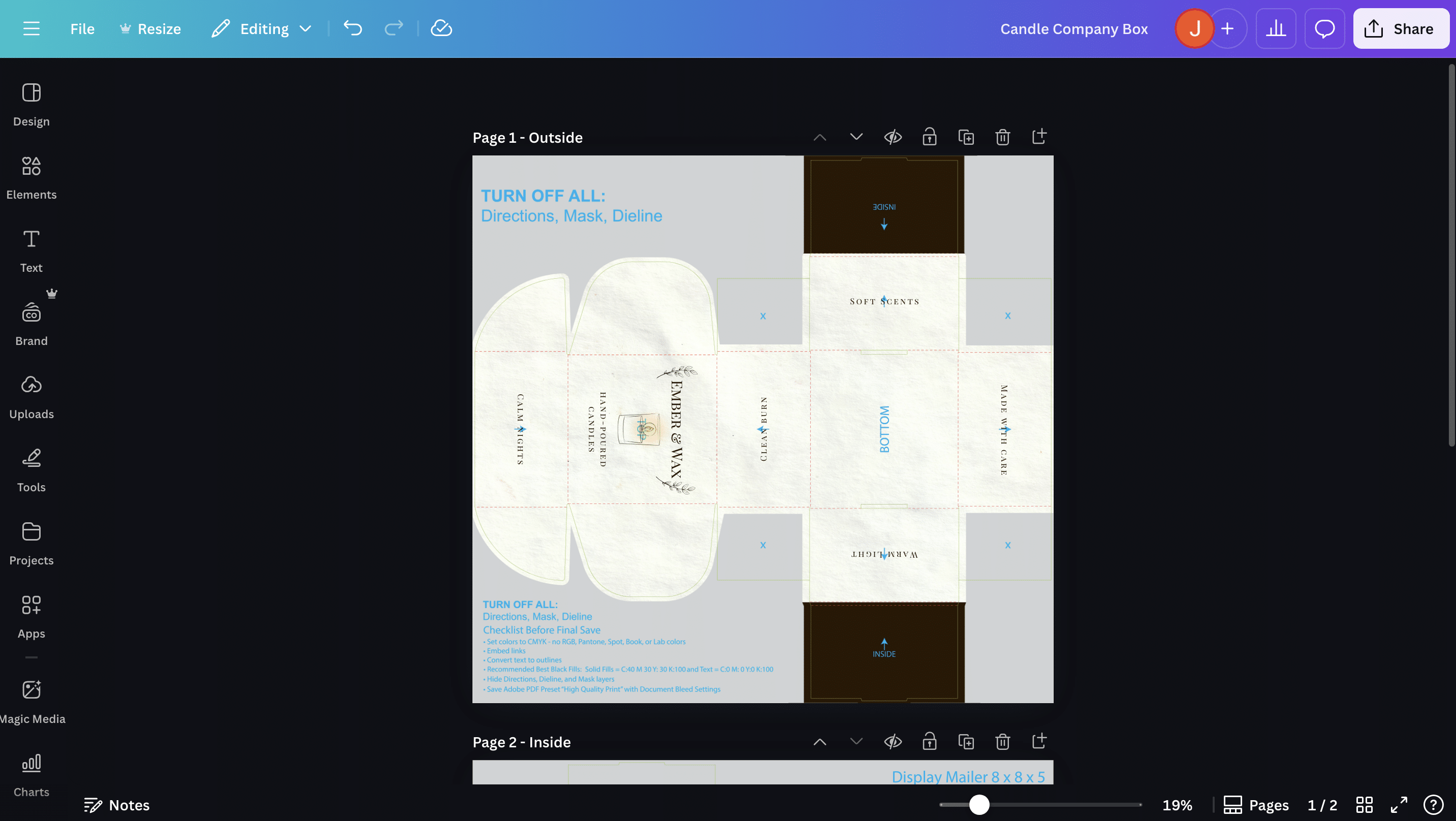
Step 3: Design & Prep This is the fun part! Add your graphics, but remember a pro-tip from our tutorial: lock your dieline layer while working so it doesn’t move. Once you’re finished, just delete the dieline and instruction layers so only your beautiful artwork remains.
Step 4: Back to BoxUp Export your design as a “PDF Print” for the best quality. Navigate back to BoxUp.com, select your box, and click “Upload and Go.” It’s that simple.
Pro-Tips for a Perfect Print
-
Keep it High Res: Canva is great, but make sure any photos you upload are high resolution so they don’t look blurry on cardboard.
-
Mind the Bleed: Extend your background colors slightly past the edges of the template to ensure there are no white gaps after cutting.
-
Don’t Forget the Bottom: People often forget to design the bottom or the inside flaps. Use that space for a “Thank You” message or your social media handles!
Ready to start?
Your brand deserves a presentation that reflects the quality of your work, and custom packaging is one of the most effective ways to make a lasting impression. Every shipment is an opportunity to reinforce your brand’s story and provide a premium experience for your customers.
If you are ready to begin, you can access our full library of templates on our Canva How-To Page. We look forward to helping you bring your vision to life and seeing the unique designs you create.